

Docker AI: Your New Best Friend for Developer Productivity
End ‘Works on My Machine’ Nightmares: Cut AI Infra Costs 30% and Ship 40% Faster With Docker
AI for Docker is changing how developers build, deploy, and scale intelligent applications by solving three core problems: dependency hell, environment inconsistency, and deployment complexity. Docker provides containers that package your AI models, code, and dependencies into portable, reproducible units that run consistently everywhere—from your laptop to production clouds.
To make this concrete, imagine a genomics team at a biopharma company using Lifebit’s federated AI platform. Their scientists work across secure Trusted Research Environments (TREs) in the UK, USA, and Europe. Without containerization, each environment risks subtle differences that can invalidate results or delay regulatory submissions. With AI for Docker and Lifebit, the same containerized AI workflows can run securely and identically across all these sites, while the sensitive patient-level data never has to move.
Quick Answer: Building AI with Docker
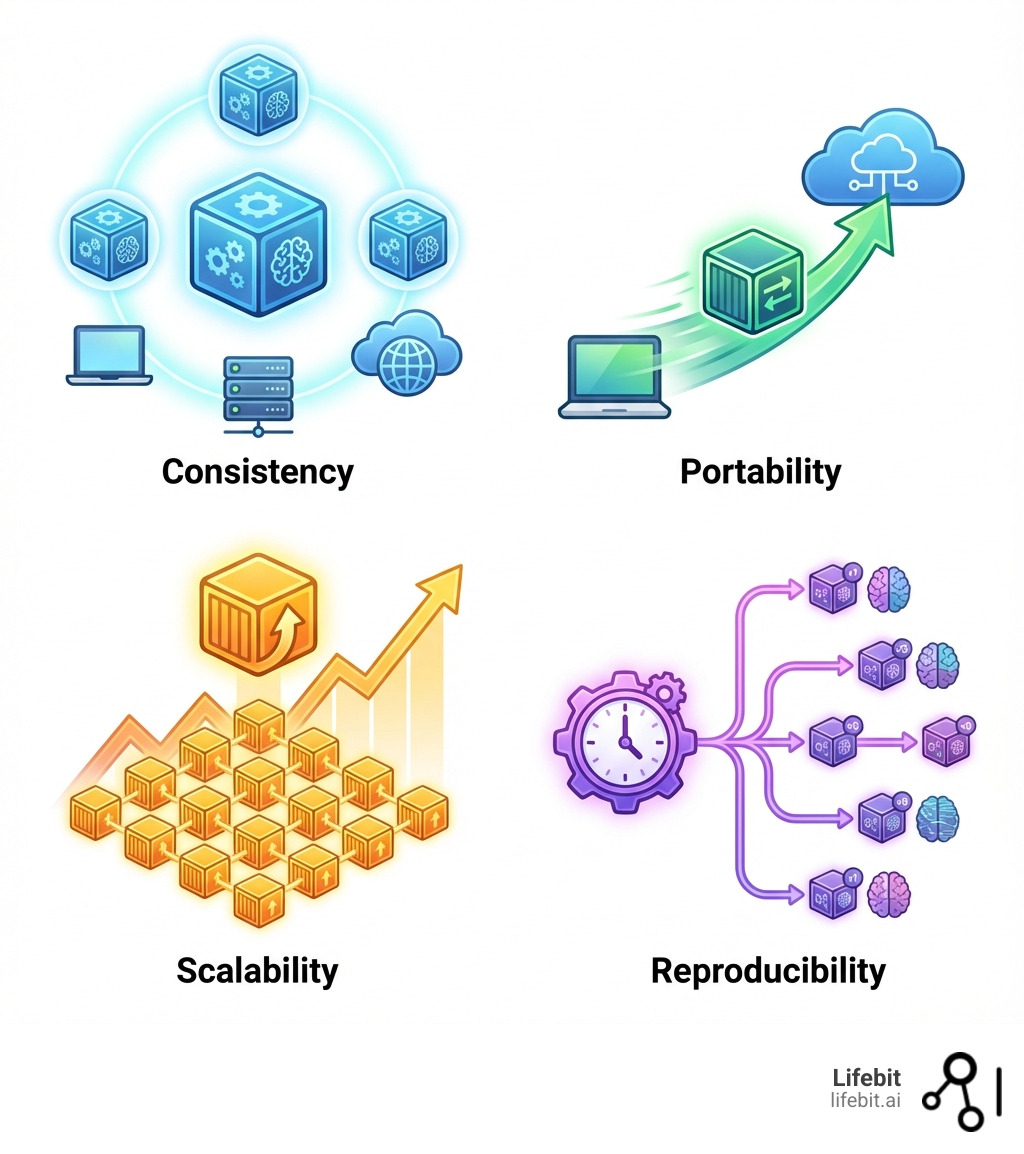
- Consistency – Your AI environment works identically across development, staging, and production
- Portability – Move containerized models between local machines, clouds, and edge devices without reconfiguration
- Scalability – Scale from one AI agent to thousands using Docker Swarm or Kubernetes
- Reproducibility – Version your entire AI stack, ensuring experiments can be replicated exactly
- Simplified Deployment – Deploy with
docker runinstead of managing complex dependencies
The numbers tell the story. Generative AI is expected to add $2.6 to $4.4 trillion in annual value to the global economy. AI has already revolutionized developer productivity by up to 10X. But without proper containerization, teams face the classic “it works on my machine” nightmare—where models that run perfectly in development fail mysteriously in production due to subtle differences in Python versions, system libraries, or CUDA drivers.
Docker eliminates this chaos. Instead of wrestling with virtual environments, CUDA installations, and configuration drift, you define your AI application once in a Dockerfile or docker-compose.yaml file. That definition becomes a blueprint that works everywhere. No more debugging why TensorFlow 2.15 works on your MacBook but crashes on AWS. No more finding that your colleague’s GPU drivers are incompatible with your code. Just consistent, predictable AI workflows.
I’m Dr. Maria Chatzou Dunford, CEO and Co-founder of Lifebit, where we leverage AI for Docker to power secure, federated genomics and biomedical data analysis for pharmaceutical companies and public health institutions globally. With over 15 years in computational biology, HPC, and health-tech, I’ve seen how containerization transforms complex AI workloads—especially when dealing with sensitive data requiring strict compliance.
The shift from basic containerization to AI-native DevOps is accelerating. Docker now offers specialized tools like Model Runner (for running LLMs locally with standardized APIs), Gordon (an AI assistant that optimizes Dockerfiles and troubleshoots containers), and MCP Gateway (for connecting AI agents to external tools securely). These innovations aren’t just incremental improvements—they’re reshaping how we think about building intelligent systems.
Ai for docker terms at a glance:
The Foundational Toolkit: Core Docker Features for AI/ML
Deploying and scaling AI agents comes with a unique set of challenges. We often grapple with environment inconsistencies, dependency conflicts, and the sheer complexity of managing diverse libraries and frameworks. This is where Docker steps in as our trusty sidekick, changing chaos into clarity. Docker’s containerization technology ensures consistency, portability, and scalability for our AI agents by encapsulating everything they need to run—code, runtime, system tools, libraries, and settings—into a single, isolated package. This package, called a container, behaves identically regardless of where it’s deployed.
This consistency is crucial for reproducible research in AI/ML. Imagine a data scientist building an AI model using a specific version of TensorFlow and Python. Without Docker, replicating that exact environment for colleagues or for future experiments can be a nightmare. Docker solves this by providing a robust MLOps foundation, allowing us to version our entire AI stack and ensure experiments can be replicated precisely, which is a fundamental requirement in AI/ML research. It’s like having a perfect recipe book for every AI experiment.
The benefits extend to simplified deployment. Instead of a lengthy setup process, deploying an AI model or agent becomes as simple as running a Docker command. This drastically speeds up our iteration cycles and allows us to focus on what truly matters: building smarter AI.
From Recipe to Reality: Mastering Dockerfiles
At the heart of Docker’s magic lies the Dockerfile. Think of it as a blueprint or a recipe for creating your AI agent’s perfect environment. It’s a simple text file that contains step-by-step instructions on how to build a Docker image. This image then becomes the consistent, isolated, and portable environment that ensures our AI models behave the same way everywhere.
When we’re crafting our Dockerfiles, we typically start with a base image. For most machine learning projects, the official Python image serves as a clean, well-maintained bedrock. But for deep learning, we often need more specialized environments. Both PyTorch and TensorFlow offer official images that come pre-loaded with all the necessary CUDA drivers and libraries. This means we can skip the notorious “CUDA installation dance” that has frustrated countless developers (and us!) over the years.
For GPU-intensive AI workloads, especially in areas like biomedical image analysis or drug discovery, seamless GPU acceleration is non-negotiable. Docker handles this beautifully. The NVIDIA CUDA runtime images are our best friends here. They provide all the GPU drivers and libraries our deep learning models need, neatly packaged inside the container where they can’t conflict with your host system. This ensures that our AI agents can fully leverage the computational power of GPUs for faster training and inference.
To keep our Docker images lean and secure, we also accept multi-stage builds. This powerful Docker feature allows us to use multiple FROM statements in our Dockerfile, separating the build-time dependencies (like compilers or development libraries) from the runtime necessities. The result? Smaller, more efficient images that are faster to pull and have a reduced attack surface—a win-win for our DevSecOps practices.
Orchestrating Your AI Symphony with Docker Compose
Real-world AI applications are rarely simple, single-container affairs. Modern AI for Docker solutions often involve multiple interconnected services: a vector database for Retrieval Augmented Generation (RAG), an LLM service, an API endpoint, and perhaps a frontend. Managing these moving parts manually can feel like trying to conduct an orchestra while playing every instrument yourself. This is where Docker Compose steps in as our conductor.
Docker Compose simplifies agents, from development to production, by allowing us to define our entire multi-container AI application stack in a single docker-compose.yml file. This YAML file describes all the services, networks, and volumes needed for our application. With a single command, docker compose up, we can bring up our entire AI ecosystem. Networking between containers happens automatically, making it easy for our LLM service to talk to the vector database, or for our API to interact with the AI agent.
This unified definition also streamlines the transition from local development to cloud deployment. The same docker-compose.yml file we use on our local machine can be deployed to cloud services like Google Cloud Run or Azure, or even used with Docker Offload for remote GPU acceleration. This consistency across environments is a game-changer, ensuring that our AI applications behave predictably whether they’re running on a developer’s laptop or a production server. We’ve seen this dramatically reduce deployment friction for complex AI models in pharmacovigilance and genomics research. You can even check out a Compose for Agents Demo to see it in action.
Your AI Supermarket: Leveraging Docker Hub
Docker Hub acts as the world’s largest library and community for container images. For us in the AI world, it’s like a supermarket brimming with pre-built environments and tools, saving us countless hours of setup time.
Instead of building every component from scratch, we can pull official images or community-contributed ones that are already optimized for AI workflows. For instance, for interactive development and data exploration, Jupyter Docker Stacks provide images loaded with Jupyter Notebook, popular data science libraries, and even GPU support for those compute-intensive experiments.
The Ollama image has become a game-changer for anyone working with large language models locally. It simplifies the entire process of deploying and running LLMs, making local experimentation accessible to everyone without the usual complex configurations. This is incredibly useful for quickly prototyping agentic AI applications.
Docker Hub also features specialized catalogs like the GenAI Hub and an AI Model Catalog, where developers can find and experiment with pre-packaged AI models and tools. This ecosystem allows us to explore popular models, orchestration tools, databases, and MCP servers with ease, fostering collaboration and accelerating development within the AI community.
The Next Frontier of ai for docker: Intelligent Tools for Agentic Apps
The world of AI is rapidly moving towards “agentic apps”—autonomous, goal-driven AI systems that can make decisions, plan, and act. These aren’t just intelligent chatbots; they’re AI applications that actively manage and optimize their own containers, leading to increased autonomy and efficiency. This shift demands a new breed of tools, and Docker is at the forefront, driving industry standards for building agents and ushering in an era of AI-native DevOps.
For teams using Lifebit across multiple Trusted Research Environments and hybrid clouds, these intelligent tools open up something powerful: agentic AI that can be deployed as Dockerized workloads directly inside secure data environments, orchestrated by Lifebit’s federated AI platform. Researchers in London, New York, Singapore, and beyond can run the same containerized agents close to sensitive datasets, while governance and compliance are enforced centrally.
Docker’s innovations are designed to simplify AI agent development and deployment, unifying models, tool gateways, and cloud infrastructure. They’re moving beyond mere code generation to assist with the full-stack assembly of containerized applications. This means developers can build with their favorite SDKs and frameworks like LangGraph, CrewAI, and Spring AI, knowing that Docker provides the robust, consistent foundation for their agentic endeavors.
Run Any Model Locally: Introducing Docker Model Runner
One of the most exciting recent developments for AI for Docker is the Docker Model Runner. It addresses a crucial pain point for AI developers: the complexity of running and testing AI models locally. Generative AI is changing software development, but building and running AI models locally has historically been harder than it should be. Docker Model Runner changes this by providing a faster, simpler way to run and test AI models locally, right from your existing Docker workflow.
What is Docker Model Runner? It’s a feature that standardizes model packaging with OCI Artifacts. This means AI models can be packaged as open-standard OCI Artifacts, allowing for distribution and versioning through the same registries and workflows we already use for containers. This enables easy pulling from Docker Hub and future integration with any container registry. It simplifies experimentation and deployment by making local model execution as simple as docker run.
The Model Runner includes an inference engine built on llama.cpp, accessible via the familiar OpenAI API. This eliminates the need for extra tools or disconnected workflows, keeping everything in one place for quick testing and iteration. Furthermore, it enables GPU acceleration on Apple silicon through host-based execution, avoiding the performance limitations often associated with running models inside virtual machines. This translates to faster inference and smoother testing, allowing our teams to iterate on application code that uses AI models much more rapidly. You can find more details in the Docker Model Runner documentation.
In a Lifebit context, this makes it easy to validate models against synthetic or de-identified data locally, then promote the same containerized models into Lifebit-managed TREs for evaluation on sensitive, real-world datasets—without changing the packaging or runtime.
Your AI Co-Pilot: Meet Gordon, the Docker AI Agent
Imagine having an AI assistant that understands your Docker environment, can anticipate problems, and even suggest solutions. That’s Gordon, Docker’s AI assistant, representing the future of working with Docker. Gordon is an embedded, context-aware assistant seamlessly integrated into Docker Desktop and the CLI, designed to deliver custom guidance for tasks like building and running containers, authoring Dockerfiles, and Docker-specific troubleshooting.
Gordon goes beyond simple code generation. It assists with the full-stack assembly of containerized applications by understanding not just your source code, but the entire application context—databases, runtimes, configurations, and more. This is about AI-native DevOps, where AI is intrinsically woven into every stage of the DevOps lifecycle.
What can Gordon do?
- Dockerfile Optimization: It can explain, rate, and optimize Dockerfiles, leveraging the latest Docker best practices. This is incredibly valuable as off-the-shelf LLMs can sometimes produce unreliable Dockerfile optimizations with subtle bugs. Gordon provides concise, actionable recommendations, often sourced directly from Docker’s high-quality documentation.
- AI-powered Troubleshooting: Gordon can help debug container build or runtime errors, suggesting fixes when a container fails to start. It can also provide contextual help for containers, images, and volumes.
- Security Scanning: Gordon includes new DevSecOps capabilities, helping us remediate policy deviations from Docker Scout and scan container images for vulnerabilities.
- Natural Language Interaction: We can ask Gordon questions in natural language, such as “How do I scale my container?” or “Containerize this project,” and it will provide guidance or even generate optimized configurations.
Gordon is designed to eliminate disruptive context-switching, keeping us in our familiar Docker environment (Desktop or terminal) and providing direct product integrations rather than just chat interfaces. It’s a true co-pilot, helping us get tasks done faster and more efficiently. You can learn more about Gordon.
When combined with Lifebit’s infrastructure automation, this means teams can move from prototype to compliant, production-grade container images for healthcare and life sciences far more quickly, while still aligning with strict security and audit requirements.
Open up External Tools with MCP Gateway and Docker Offload
Agentic AI applications thrive on their ability to interact with the outside world, calling external tools and services to achieve their goals. This is where the Model Context Protocol (MCP) and Docker’s MCP Gateway come into play.
The MCP Gateway acts as a unified control plane, consolidating multiple MCP servers into a single, consistent endpoint for our AI agents. This standardizes how AI agents find and execute external tools, ensuring secure and reliable communication. It’s a critical component in the architecture of an agentic AI application, unifying models, agents, and the gateway itself. Industry standards for building agents, like the MCP Gateway, seamlessly integrate with Docker, providing a structured way for agents to interact with diverse capabilities. For instance, an agent might use an MCP server to access a search engine to verify facts, as demonstrated in a Docker example where an “Auditor” agent coordinates “Critic” and “Reviser” sub-agents.
In regulated biomedical settings, these same patterns can be applied inside Lifebit-powered environments: MCP-connected agents can reach internal knowledge bases, governed datasets, and analytics tools exposed from within a Trusted Data Lakehouse (TDL), while all access is logged for governance and compliance.
For AI workloads that demand serious computational muscle, especially those requiring GPUs, Docker offers Docker Offload. This feature gives developers access to remote Docker engines, including powerful GPUs, while using the same Docker Desktop they already use. This enables faster GPU acceleration for AI workloads by offloading compute-intensive tasks to more powerful remote hardware. The best part? We can use our familiar Docker Compose workflows to deploy these GPU-accelerated applications, making the transition to production-ready AI seamless. This is particularly valuable for our work in biomedical data analysis, where large datasets and complex models require significant computational resources.
From Localhost to Production: Real-World Wins and Best Practices
The benefits of AI for Docker are not theoretical; they translate into tangible real-world improvements in speed, cost, and efficiency across various industries. From local development to large-scale cloud deployment, Docker provides the robust, consistent, and scalable foundation needed for critical AI applications.
For organizations using Lifebit across five continents, this means the same containerized AI pipelines can run in on-premise environments, national research infrastructures, and public clouds, all while data stays in place. Docker provides the portability; Lifebit adds federated governance, auditability, and secure access to biomedical and multi-omic data.
Case Studies: How Industries are Winning with ai for docker
We’ve seen compelling evidence of Docker’s impact in diverse fields:
- Financial Services: A leading fintech company deploying multiple AI-powered trading bots used Docker Swarm and Kubernetes. They achieved a remarkable 40% improvement in execution speed for their trading algorithms and reduced infrastructure costs by 30%, all while maintaining zero downtime. This demonstrates how Docker’s scalability and resource efficiency directly impact critical, high-stakes applications.
- Healthcare: A hospital integrating AI agents with Docker and Kubernetes for disease diagnosis saw 30% faster diagnosis times. This accelerated diagnosis leads to lower operational costs and, more importantly, faster treatment for patients, showcasing Docker’s role in improving efficiency and patient outcomes.
- Data Management: Retina.ai, a company managing client data for machine learning models, experienced a 3x faster cluster spin-up time by using custom Docker containers on its cloud platform. This optimization in startup times significantly reduces costs and accelerates their machine learning workflows.
These examples highlight how Docker facilitates the transition of AI applications from local development to cloud deployment, enabling organizations to achieve significant operational and financial advantages.
Within Lifebit deployments, similar patterns apply: containerized AI/ML workflows can be promoted from development sandboxes into production Trusted Research Environments with confidence that the behavior will remain consistent, supporting reproducible science and regulatory-grade evidence generation.
Best Practices for Containerizing Your AI Applications
To maximize the benefits of AI for Docker, we adhere to several best practices for containerizing our AI applications:
- Use lightweight images: We start with minimal base images (like Alpine-based Python images) and only include the necessary dependencies. This reduces image size, improves security, and speeds up build and deployment times.
- Use a
.dockerignorefile: Similar to.gitignore, this file prevents unnecessary files (like.gitdirectories, local configuration files, or large datasets not needed in the final image) from being copied into the Docker image, optimizing build context and image size. - Leverage multi-stage builds: As discussed earlier, we use multi-stage builds to separate build-time tools from runtime components, resulting in smaller, more secure final images.
- Pin dependencies with
requirements.txt: For Python-based AI applications, we always use arequirements.txt(or similar for other languages) with exact version numbers for all dependencies. This ensures perfect reproducibility of our environment, solving the “dependency hell” problem once and for all. - Optimize Dockerfile layers: Each instruction in a Dockerfile creates a new layer. We combine commands where possible (e.g.,
RUN apt-get update && apt-get install -y ...) to minimize the number of layers, which improves build cache efficiency and image size. - Start with secure base images: We prioritize official, trusted base images from reputable sources and keep them regularly updated. This forms a strong security foundation for our containerized AI applications.
Applied within Lifebit’s platform, these practices help biopharma, governments, and public health agencies ship compliant, Dockerized AI models faster—without compromising on security, reproducibility, or governance.
Frequently Asked Questions about AI for Docker
How does Docker handle GPU-intensive AI workloads?
Docker integrates seamlessly with NVIDIA drivers via official NVIDIA CUDA images, allowing containers to access host GPUs. These images come pre-configured with the necessary drivers and libraries, eliminating complex manual installations. For more power, Docker Offload provides access to remote, high-performance GPUs while maintaining a local development workflow, enabling faster GPU acceleration for our most demanding AI workloads.
What is the difference between Docker Model Runner and just running a model in a container?
While you can certainly run an AI model within any Docker container, Docker Model Runner goes a step further. It standardizes how models are packaged (as OCI Artifacts) and run, providing a consistent OpenAI-compatible API out-of-the-box. This abstracts away the complex setup of inference engines and specific model serving frameworks. It makes local model experimentation as simple as docker run, allowing us to easily pull models from Docker’s GenAI Hub and get them running quickly, without worrying about underlying configurations.
How does using Docker improve security for AI applications?
Docker significantly improves security through container isolation, which sandboxes AI applications and their dependencies from the host system and from each other. This prevents dependency conflicts and limits the blast radius of any potential vulnerability. Furthermore, tools like Docker Scout, integrated into the AI agent Gordon, automatically scan for vulnerabilities in our container images, providing continuous DevSecOps capabilities. The MCP Gateway also plays a crucial role by securely managing how our AI agents access and interact with external tools, ensuring that sensitive data and operations are handled with appropriate controls.
Conclusion: The Future is Agentic, and Docker is Your Engine
The synergy of AI for Docker is rapidly changing how we develop, deploy, and manage intelligent applications. It transforms the messy, complicated world of AI development into something smooth, consistent, and scalable. From providing the foundational toolkit of Dockerfiles and Compose to pioneering intelligent tools like Model Runner, Gordon, and MCP Gateway, Docker has grown from a simple tool for application packaging to an indispensable partner in the AI age.
The future of AI is increasingly “agentic”—autonomous, goal-driven systems that decide, plan, and act. Docker is the engine powering this future, enabling the creation of self-managing containers and the promise of AIOps, where AI applications actively optimize their own environments. This deep link between AI and containerization creates a new way of developing software, one that promises unprecedented speed and breakthroughs.
For organizations in highly regulated fields like biomedical research, combining this powerful Docker ecosystem with a federated AI platform like Lifebit enables secure, scalable, and compliant AI innovation on sensitive data. Our platform, with its built-in capabilities for harmonization, advanced AI/ML analytics, and federated governance, powers large-scale, compliant research and pharmacovigilance across biopharma, governments, and public health agencies in the UK, USA, Europe, and beyond. This allows us to deliver real-time insights, AI-driven safety surveillance, and secure collaboration across hybrid data ecosystems.
AI for Docker isn’t just a trend; it’s the new standard for developer productivity and the robust foundation upon which the next generation of intelligent applications will be built. We invite you to accept this powerful combination and open up the full potential of your AI initiatives.
Ready to transform your AI development and deployment? Explore the Lifebit Platform to see how we’re leveraging AI for Docker for secure, real-time access to global biomedical and multi-omic data.
Related from Lifebit
The Federated Trusted Research Environment (TRE)
Production federated TRE platform for federal health programs — deployed at NIH National Library of Medicine (FedRAMP ATO), Genomics England, the Danish National Genome Center, and CanPath. Patient data stays at source; analytics run across institutions; results travel through policy-controlled airlock.