

The Best Cloud-Based EMR Software: A Comprehensive Guide

2026 Guide: How Cloud Based EMR Cuts IT Costs by 82% Without Risking Patient Data
Cloud based EMR (Electronic Medical Record) systems are digital health platforms hosted on remote servers that let healthcare providers access, update, and share patient records securely from anywhere with internet access—without the need for expensive on-site hardware or IT infrastructure. Unlike traditional client-server models, these systems operate on a Software-as-a-Service (SaaS) model, where the vendor handles all maintenance, security, and storage.
Quick Answer: What Makes Cloud Based EMR Different?
- Accessibility: Access patient records from any device, anywhere, anytime
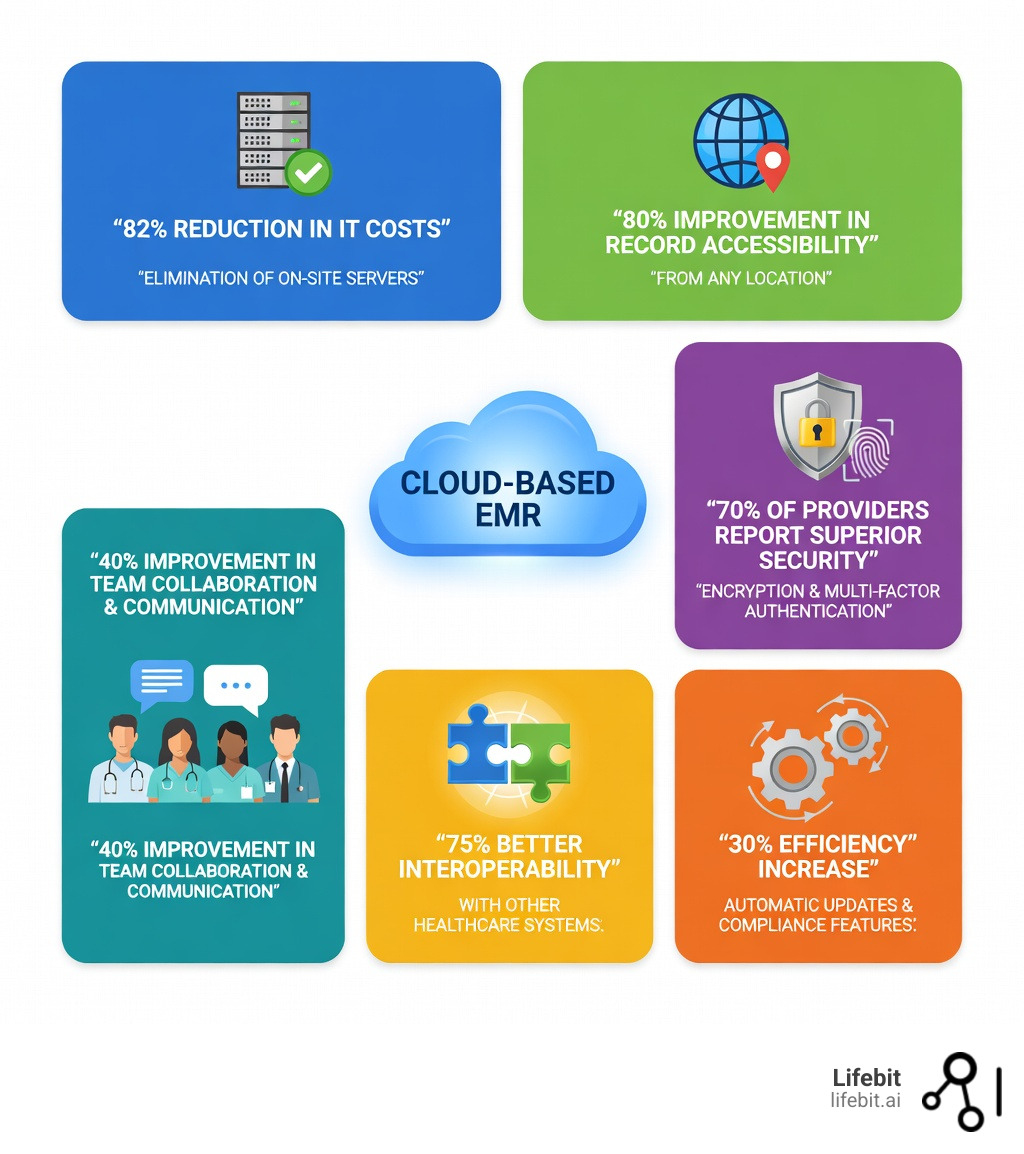
- Cost Savings: 82% of organizations cut IT costs by eliminating on-site servers
- Automatic Updates: 30% efficiency boost with instant compliance updates
- Superior Security: 70% of providers report better security than on-premise systems
- Scalability: Grow your practice without hardware upgrades
- Interoperability: 75% report better data sharing with other systems
The healthcare industry is in the middle of a massive shift. Traditional on-premise EMR systems—with their clunky servers, expensive maintenance contracts, and limited access—are being replaced by cloud-based platforms that deliver real-time data, AI-powered insights, and seamless collaboration across care teams. This evolution is driven by the 21st Century Cures Act, which mandates easier data sharing and prohibits “information blocking,” making the rigid silos of old-school servers obsolete.
This isn’t just about technology. It’s about patient outcomes. When providers can access complete, up-to-date records instantly, they make better decisions faster. For instance, in emergency departments, having immediate access to a patient’s allergy list or recent surgical history can be the difference between life and death. When systems talk to each other, patients avoid duplicate tests and dangerous drug interactions. When administrative tasks are automated, clinicians spend more time with patients, reducing the “pajama time” spent on documentation after hours.
But the transition isn’t simple. Healthcare leaders face tough questions: Is the cloud really secure enough for patient data? What about HIPAA compliance? How do we migrate years of records without disrupting care? What are the real costs—and hidden risks? The shift from a Capital Expenditure (CapEx) model to an Operational Expenditure (OpEx) model requires a fundamental change in how clinics budget for technology.
This guide answers all of those questions. We’ll break down what makes modern cloud-based EMR systems work, compare top platforms, explain security and compliance requirements, and show you how to avoid the implementation pitfalls that trip up most organizations. We will also explore how the integration of Artificial Intelligence and Machine Learning is turning these records from passive storage into active diagnostic tools.
I’m Maria Chatzou Dunford, CEO and Co-founder of Lifebit, where we’ve built federated genomics and biomedical data platforms that power secure, compliant cloud based EMR analytics for pharmaceutical companies and public health institutions worldwide. Over 15 years in computational biology, AI, and health-tech, I’ve seen how the right cloud infrastructure transforms healthcare delivery—and how the wrong approach creates expensive disasters.
Common Cloud based EMR vocab:
Why On-Premise Servers Are Dead: The 2026 Shift to Cloud Based EMR
For decades, medical practices were anchored by “the server room”—a chilly, humming closet filled with expensive hardware that required constant attention. These rooms were not just physical spaces; they were liabilities. They required specialized cooling systems, uninterruptible power supplies (UPS), and physical security to prevent unauthorized access. Today, that model is effectively dead. Research shows that a staggering 82% of healthcare organizations experienced reduced IT costs after transitioning to cloud based EMR systems. By eliminating the need for local servers, clinics free up physical floor space and, more importantly, capital.
The financial argument for the cloud is overwhelming. In an on-premise setup, a practice must pay for the hardware upfront, pay for the software license, and then pay an IT consultant or staff member to maintain it. When the server reaches its end-of-life (usually every 3-5 years), the cycle repeats. With a cloud-based system, these costs are replaced by a predictable monthly subscription. This “pay-as-you-go” model allows practices to scale their costs exactly to their patient volume, ensuring that a small clinic isn’t paying for the infrastructure of a large hospital.
The barriers to traditional EHR implementation—technical complexity, high upfront financial requirements, and organizational resistance—are being dismantled by cloud computing. According to scientific research on EHR implementation barriers, technical errors and system rigidity often hampered early adoption. Cloud platforms solve this through “platform independence,” meaning the software runs in a web browser or app regardless of whether you use a PC, Mac, or tablet. This eliminates the “version hell” where different computers in the same office run different software versions.
Accessibility is perhaps the most immediate “win.” Roughly 80% of healthcare providers reported improved accessibility to patient records after moving to the cloud. Whether a doctor is at a multi-site practice, a mobile clinic, or responding to an after-hours emergency from home, the data is there. This flexibility is supported by scientific research on cloud-based EHR capabilities, which highlights how cloud architectures facilitate the seamless exchange of medical images and records across different hospital information systems. In the modern era of “hybrid work,” the ability for a physician to finish their charts from a home office without a clunky VPN is a major factor in reducing burnout.
Finally, consider the “innovation gap.” On-premise systems often lag years behind in software versions because manual updates are disruptive and risky. If an update fails on a local server, the clinic goes dark. In contrast, cloud systems use automatic updates, often deployed in the middle of the night with zero downtime. Organizations that leverage these continuous innovations see a 30% increase in operational efficiency, ensuring they always have the latest security patches, clinical tools, and regulatory reporting features without lifting a finger. This ensures that the practice is always compliant with the latest CMS (Centers for Medicare & Medicaid Services) requirements, protecting their reimbursement rates.
Stop Guessing: 5 Cloud Based EMR Features That Improve Outcomes by 30%
A modern cloud based EMR is much more than a digital filing cabinet; it is a clinical co-pilot. High-performance systems today are often “AI-native,” meaning they don’t just store data—they interpret it. According to research by Accenture, AI applications integrated into cloud EMRs can improve clinical outcomes by 30% by assisting with risk stratification and clinical decision support. For example, a cloud system can scan a patient’s entire history in milliseconds to flag a subtle pattern of rising creatinine levels that a human might miss, alerting the provider to potential kidney issues before they become critical.
Key features you should look for include:
- Integrated Telehealth: Following a 38x surge in telehealth usage since the pandemic, having video consultations built directly into the patient chart is no longer optional. It allows for real-time charting during the call, improving accuracy. The cloud makes this possible by handling the massive bandwidth requirements of high-definition video without taxing the clinic’s local internet connection.
- Interoperability Standards (FHIR & APIs): The best systems use FHIR (Fast Healthcare Interoperability Resources) and REST APIs to talk to labs, pharmacies, and other providers. Scientific research on secure EHR sharing emphasizes that a hybrid cloud approach can enable secure sharing while maintaining strict privacy. This means when a patient sees a specialist, the notes are automatically pushed back to the primary care provider’s cloud EMR.
- Patient Portals & Engagement: These empower patients to view results, message providers, and book appointments. This significantly reduces the administrative load on front-desk staff. Modern portals also allow for “digital intake,” where patients fill out their history on their own smartphone before arriving, which then auto-populates the EMR chart.
- Real-Time Analytics & Population Health: Instead of waiting for end-of-month reports, cloud systems provide live dashboards. You can see, at a glance, which patients with diabetes are overdue for an A1c test or which providers have the highest patient satisfaction scores. This data-driven approach is essential for participating in Value-Based Care contracts.
- Ambient Clinical Intelligence: Using the microphone on a tablet or phone, the cloud EMR can listen to the patient-doctor conversation and use Natural Language Processing (NLP) to draft the clinical note automatically. This can save a physician up to two hours of documentation time per day.
Maximizing Efficiency with Cloud Based EMR Automation
Automation is the secret sauce of a profitable practice. By moving workflows to the cloud, tasks that used to take hours now happen in seconds. For example, revenue cycle management (RCM) tools can automatically check for “clean claims” before submission, drastically reducing the number of denials. This ensures that the practice gets paid faster and spends less time on administrative appeals.
| Feature | Manual/On-Premise Workflow | Automated Cloud Workflow |
|---|---|---|
| Software Updates | Manual install; system downtime | Background updates; zero downtime |
| Data Backups | Physical tapes/drives; high risk | Real-time redundancy; automated |
| Patient Check-in | Paper forms; manual data entry | Digital pre-check; auto-sync to chart |
| Lab Results | Faxed/scanned; manual filing | eDelivery; instant provider alert |
| Billing | Manual coding; high error rate | AI-assisted coding; 98%+ clean claims |
| Prescriptions | Paper/Phone calls to pharmacy | Instant e-Prescribing with drug-interaction checks |
| Referrals | Faxing records; manual follow-up | Digital referral loops with status tracking |
| Patient Reminders | Staff making manual phone calls | Automated SMS and email reminders |
By leveraging these automated workflows, practices can often operate with 20% fewer administrative staff or redirect those staff members to higher-value tasks like patient navigation and care coordination. This shift not only saves money but also improves the patient experience, as staff are less stressed and more available to help.
End the Compliance Nightmare: Why 70% of Providers Trust Cloud Based EMR Security
One of the biggest myths in healthcare is that “if I can see the server, it’s safer.” In reality, a server sitting in a closet is vulnerable to fire, flood, theft, and even disgruntled employees with a USB drive. 70% of healthcare providers now believe that cloud based EMR systems offer superior security compared to on-premises solutions. Why? Because a cloud provider like AWS, Google Cloud, or Microsoft Azure spends billions on security—far more than any individual clinic or even a regional hospital system could ever afford.
Cloud security is built on a “layered” defense. This includes data encryption (both at rest and in transit), multi-factor authentication (MFA), and rigorous audit trails that track every single person who views a record. Scientific research on protecting health records in the cloud suggests that hierarchical frameworks and federated identity attributes are essential for maintaining control in multi-user environments. This means you can set granular permissions: a receptionist can see the schedule but not the clinical notes, while a nurse can see the vitals but not the billing data.
Furthermore, disaster recovery is built-in. If a clinic suffers a fire, flood, or local ransomware attack, the data remains safe in the cloud. In an on-premise world, a ransomware attack often means the end of the business because backups are often stored on the same network and get encrypted too. In the cloud, data is versioned and stored across multiple geographic locations. Automatic backups ensure that the “Recovery Point Objective” (RPO) is measured in minutes, not days. If your office computer is stolen, no data is lost because no data was actually stored on that machine’s hard drive.
Regulatory Requirements for Cloud Based EMR Adoption
Compliance isn’t just about avoiding fines; it’s about building trust. In the US, any cloud based EMR must be HIPAA (Health Insurance Portability and Accountability Act) compliant. This requires the vendor to sign a Business Associate Agreement (BAA), which legally binds them to protect your data. But HIPAA is just the floor. Modern systems also look toward SOC 2 Type II certification, which proves that the vendor’s security controls have been audited by an independent third party over a period of time.
Providers should also look for:
- Meaningful Use/MACRA/MIPS Certification: This ensures your system meets government standards for quality reporting, which is tied to your reimbursement rates. Without this, you could face significant financial penalties from Medicare.
- TEFCA Standards: The Trusted Exchange Framework and Common Agreement aims to create a “floor” for interoperability across the country, allowing different cloud EMRs to talk to each other as easily as cell phone networks do.
- Data Residency/Sovereignty: For our partners in Canada (PIPEDA) and Europe (GDPR), it is often a legal requirement that patient data stays within national borders. Many cloud providers now offer “region-specific” hosting to satisfy these laws, ensuring that a German patient’s data never leaves a server located in Frankfurt.
- Zero Trust Architecture: This is the gold standard of modern security. It assumes that every access request is a potential threat, requiring continuous verification of identity and device health before granting access to any patient record.
Avoid the ‘Hanging’ System: How to Migrate to Cloud Based EMR Without Downtime
While the long-term savings are clear, the initial transition requires a strategic approach. The global healthcare cloud computing market is growing at a CAGR of 18.7%, yet many implementations struggle because of “people problems,” not technical ones. A “hanging” system—where the software is slow or crashes during peak hours—is usually the result of poor planning or inadequate local internet bandwidth.
The 5-Phase Migration Strategy
- The Audit Phase: Before moving a single record, you must audit your current data. “Garbage in, garbage out” applies here. If your old system has duplicate patient records or incomplete charts, moving them to the cloud will only amplify the problem. This is the time for data cleansing.
- The Infrastructure Check: While you don’t need servers, you do need a robust internet connection. Most experts recommend a primary fiber connection with a secondary “failover” connection (like 5G or a different ISP) to ensure the clinic never goes offline.
- The Data Migration: Moving decades of messy data from an old server to a clean cloud database is a complex task. Scientific research on cloud-based architecture for EHR notes that a well-structured migration plan is the difference between success and a system that “hangs.” This often involves “mapping” fields from the old database to the new one.
- The Training Phase: Staff used to paper or old systems may resist the change. Comprehensive training is non-negotiable. We recommend a “Super User” approach, where one person from each department (nursing, billing, front desk) is trained early and acts as a local expert for their peers.
- The Go-Live and Optimization: Don’t just turn it on and walk away. The first 30 days are critical for gathering feedback and tweaking workflows. Most practices see a temporary dip in productivity for the first two weeks, followed by a significant and permanent increase.
Common challenges include “Training Gaps” and “Administrative Support.” Without “buy-in” from leadership, the transition can stall. The “hidden costs” of cloud systems are usually found in subscription tiers. While you save on hardware, you must account for monthly per-user fees. However, when you factor in the elimination of IT consultants, electricity for servers, and hardware refresh cycles, the cloud remains the clear financial winner. A typical 5-provider practice can save upwards of $50,000 over five years by making the switch.
Cloud Based EMR: Your Top Questions Answered
Is cloud EMR more secure than local servers?
Yes. Roughly 70% of providers now view the cloud as more secure. Cloud systems use enterprise-grade encryption (AES-256) and 24/7 monitoring by dedicated security teams that far exceeds what a local IT person can provide. They also eliminate the risk of physical theft or damage to an on-site server. Furthermore, cloud providers are subject to rigorous third-party audits that most small businesses could never pass.
How does cloud EMR support telehealth?
Most cloud based EMR platforms now feature native telehealth integration. Because the system is already online, it can host secure video sessions that sync directly with the patient’s record. This allows for real-time charting and instant ePrescribing during the visit. This helped support the 38x increase in telehealth usage seen globally, as providers didn’t need to set up separate, disconnected video software.
What are the ongoing costs of cloud-based systems?
Unlike on-premise systems that require a massive “capital expenditure” (CapEx) every 5 years for new hardware, cloud systems operate on an “operational expenditure” (OpEx) model. You pay a predictable monthly or annual subscription fee. This usually covers hosting, security, support, and all software updates. While the monthly fee might seem higher than a one-time license, the Total Cost of Ownership (TCO) is almost always lower because it includes all the “hidden” costs of IT.
What happens if the internet goes down?
This is the most common concern. Modern practices mitigate this by having a secondary internet connection (like a 4G/5G backup). Additionally, many cloud EMRs offer an “offline mode” or a mobile app that can cache data locally, allowing you to continue seeing patients and sync the data once the connection is restored.
Who owns the data in a cloud EMR?
Legally, the healthcare provider owns the patient data. Your contract with the cloud vendor should explicitly state that they are merely the “custodian” of the data and that you can export your data in a standard format (like HL7 or CCDA) if you ever decide to leave the platform. Always check the “data portability” clause before signing.
Can a cloud EMR help with medical billing?
Absolutely. Most modern cloud systems have integrated Revenue Cycle Management (RCM). They can automatically verify insurance eligibility before the patient arrives, suggest the correct ICD-10 codes based on the doctor’s notes, and scrub claims for errors before they are sent to the payer. This typically results in a 10-15% increase in collections.
Is it difficult to switch from one cloud EMR to another?
While it is easier than moving from paper, switching EMRs is always a significant undertaking. The use of standardized data formats like FHIR is making this easier, but you should still plan for a 3-6 month transition period to ensure all historical data is mapped correctly to the new system.
Future-Proof Your Practice: Why Cloud Based EMR is the Foundation for 2026
The move to a cloud based EMR is no longer a “luxury” for tech-forward clinics—it is a survival requirement in a competitive, data-driven landscape. The benefits of 82% IT cost savings, 40% better collaboration, and 30% improved clinical outcomes are too significant to ignore. As we move toward 2026, the focus is shifting from simple data storage to “Data Intelligence.”
At Lifebit, we understand that the true value of healthcare data lies in its ability to be accessed securely and analyzed in real-time. Our next-generation federated AI platform is built for this exact purpose—enabling biopharma, governments, and public health agencies to work with sensitive biomedical and multi-omic data without moving it. This “federated” approach mirrors the best practices of modern cloud EMRs: keeping data secure, compliant, and accessible for high-impact research while respecting the privacy of the individual.
Whether you are a clinic looking to modernize your patient care or a research institution needing to harmonize global health records, the cloud is your foundation. By choosing a system that prioritizes security, interoperability, and AI-driven insights, you aren’t just upgrading your software—you are future-proofing your mission to save lives. The future of medicine is personalized, predictive, and preventative, and none of that is possible without the scalable power of the cloud.
Discover how Lifebit powers secure, global data collaboration.