

Beyond Batch: Unlocking Real-Time Analytics on Databricks

Databricks Real-Time Analytics: Cut Latency to 5ms and Stop Fraud Instantly
Databricks real-time analytics enables organizations to process streaming data with end-to-end latency as low as 5 milliseconds, changing how businesses respond to fraud, patient events, and operational anomalies. Here’s what you need to know:
- What it is: A unified platform that processes both batch and streaming data using Apache Spark Structured Streaming on a Lakehouse architecture
- Key capability: Real-time mode achieves P99 latencies of 15–200 milliseconds for mission-critical pipelines like fraud detection and patient monitoring
- Core components: Delta Live Tables, Unity Catalog, and Photon Engine automate ETL, governance, and query acceleration
- How it works: Streaming shuffle passes data in memory between stages, eliminating fixed scheduling delays of traditional micro-batch processing
- When to use it: Operational workloads requiring immediate action—blocking fraudulent transactions, triggering patient alerts, or personalizing content in real time
Traditional batch processing delivers insights in minutes or hours. Real-time analytics delivers them in milliseconds.
In healthcare and life sciences, this speed gap can mean the difference between catching an adverse drug reaction before harm spreads and finding it too late. In pharma research, it’s the difference between identifying a promising target today and weeks from now. For regulatory bodies processing safety signals across federated EHR networks, sub-second latency isn’t a luxury—it’s a requirement.
The Databricks Lakehouse merges data lakes and data warehouses into a single foundation that handles streaming, analytics, and AI workloads together. Delta Lake adds ACID transactions and time travel to streaming data. Structured Streaming treats real-time computation like batch jobs, using familiar Spark APIs. And the new real-time mode eliminates coordination overhead to achieve latencies that were previously impossible without replatforming.
But speed alone isn’t enough. Organizations also need governance, data quality, and security—especially when working with sensitive patient data or federated datasets that never leave their source. That’s where Unity Catalog, Delta Live Tables, and checkpoint v2 come in, ensuring compliance and fault tolerance even at scale.
I’m Maria Chatzou Dunford, CEO and Co-founder of Lifebit, where we’ve spent years building federated AI platforms that power real-time evidence generation across 275M+ patient records. Databricks real-time analytics is the backbone of many secure, compliant workflows we enable for pharma, public health, and regulatory organizations globally. This guide will show you how to implement it.
Databricks real-time analytics glossary:
Stop Data Lag: Why Split Architectures Fail and Lakehouse Wins
To understand how databricks real-time analytics functions, we have to look at the foundation: the Databricks Lakehouse. For years, organizations were forced to maintain two separate systems—a data lake for massive amounts of raw data and a data warehouse for structured, high-performance analytics. This “split” architecture created a lag. Data had to be moved, transformed, and synchronized, which is the natural enemy of real-time insights.
The Lakehouse architecture eliminates this friction. It brings the reliability and performance of a data warehouse directly to the data lake. By using Delta Lake as the storage layer, we get ACID transactions, which prevent data corruption during simultaneous reads and writes—a frequent occurrence in high-speed streaming. This creates a Data Intelligence Platform where data is always “live” and ready for both BI and AI workloads.
4 Tools You Need for 5ms Latency
Several specialized tools work together within this architecture to ensure that data flows without bottlenecks:
- Delta Live Tables (DLT): This is the framework for building reliable data pipelines. It automates the complex “plumbing” of ETL (Extract, Transform, Load). Instead of manually managing dependencies, we define the data flow, and DLT handles the rest, including automatic recovery and scaling.
- Unity Catalog: Governance is often the biggest hurdle in highly regulated markets like the UK, USA, and Israel. Unity Catalog provides a single place to manage access permissions and track data lineage across all streaming assets.
- Photon Engine: This is a next-generation vectorized query engine. It is written in C++ and designed to accelerate query performance significantly, making near-instant ad-hoc analytics on streaming data a reality.
- Structured Streaming: This is the underlying engine based on Apache Spark. It allows us to write streaming queries using the same APIs we use for batch jobs. You can learn more about these Structured Streaming concepts to see how it simplifies development.
Medallion Architecture: Cleaning Data at High Speed
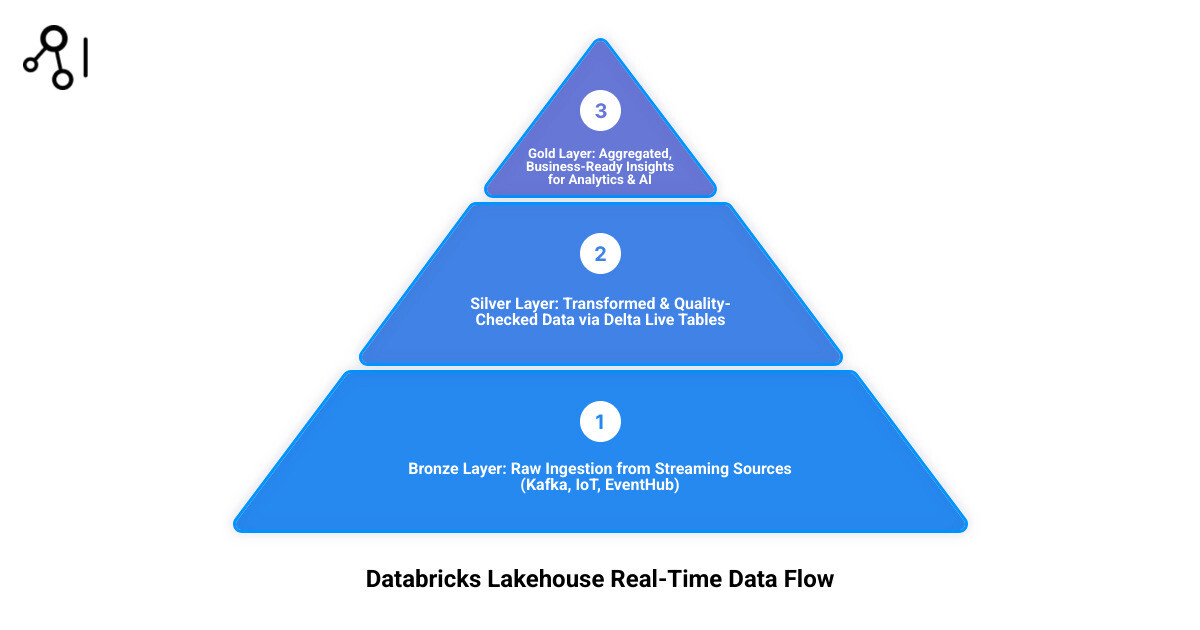
We typically organize real-time data using the Medallion Architecture, which progressively refines data as it moves through three layers:
- Bronze (Raw): This is the landing zone. Data is ingested from sources like Kafka, Kinesis, or IoT sensors exactly as it is. It’s our “source of truth.”
- Silver (Filtered/Cleansed): Here, we perform real-time changes. We join different streams, filter out noise, and apply quality checks. This layer is crucial for Big Data Analytics Complete Guide level processing because it ensures the data is “clean” enough for analysis.
- Gold (Aggregated): This is the final layer where data is ready for business consumption. It contains high-level aggregates (like “current active users” or “patient heart rate average over 5 minutes”) that feed directly into dashboards and ML models.
Enable 5ms Real-Time Mode: Your Step-by-Step Implementation Guide
The most exciting recent development in databricks real-time analytics is “Real-Time Mode.” While traditional Spark Structured Streaming uses “micro-batches” (processing data in tiny chunks every few seconds), Real-Time Mode moves to a continuous processing model.
In this mode, Databricks uses a streaming shuffle to pass data between tasks in memory. This eliminates the need to write intermediate data to disk and removes the overhead of scheduling new tasks for every micro-batch. The result? End-to-end latency as low as 5 milliseconds.
| Feature | Micro-batch Mode | Real-time Mode |
|---|---|---|
| Latency | Seconds to sub-seconds | 5ms to 100ms |
| Scheduling | Periodic (fixed intervals) | Continuous (simultaneous) |
| Data Transfer | Disk-based shuffles | In-memory streaming shuffle |
| Best Use Case | Analytical dashboards, ETL | Fraud detection, Operational alerts |
To enable this, you don’t need to rewrite your code. You simply update your trigger configuration in your Real-time mode in Structured Streaming setup.
Cluster Tuning: Settings for Millisecond Performance
Achieving millisecond performance requires specific cluster settings. Because Real-Time Mode schedules all query stages simultaneously, your cluster must have enough “task slots” to handle the entire pipeline at once.
- Disable Autoscaling: For ultra-low latency, you cannot wait for the cluster to scale up. Use a fixed-size cluster.
- Dedicated Access Mode: Real-time jobs perform best on clusters set to “Dedicated” access.
- Slot Calculation: If you have a Kafka source with 8 partitions and a shuffle stage with 20 partitions, you need at least 28 task slots (8 + 20) available on your cluster.
- Spark Config: You must enable the feature by adding
spark.databricks.streaming.realTimeMode.enabled trueto your Spark configuration.
For a deeper dive into resource tuning, our Advanced Analytics Ultimate Guide covers how to balance these requirements with cost management.
Metrics That Matter: Measuring 5ms Latency
In databricks real-time analytics, you can’t manage what you can’t measure. Traditional batch metrics aren’t helpful when you’re chasing 5ms latencies.
We use the StreamingQueryProgress object to monitor health. Key metrics include:
- processingLatencyMs: The time it takes to process a record once it’s read.
- sourceQueuingLatencyMs: How long data sits in the source (like Kafka) before being picked up.
- e2eLatencyMs: The total time from the event occurring at the source to the result being written.
We also leverage Aggregations functions to calculate P99 latencies, ensuring that 99% of our data is processed within our target SLA.
Real-Time Success: How Global Leaders Stop Fraud in 200ms
The power of databricks real-time analytics is best seen in action. When we move beyond “reports” to “actions,” the business value explodes.
- Fraud Detection: A global bank uses Databricks to process credit card transactions from Kafka. By running ML models in real-time, they flag suspicious activity within 200 milliseconds—stopping the transaction before it’s even approved.
- Personalized Fitness: Tonal, the connected fitness company, reduced their analytics latency from minutes to seconds. This allows them to provide Real-Time Patient Insights (or in their case, athlete insights) to adjust workout intensity on the fly based on live movement data.
- Supply Chain: Manufacturers monitor IoT sensors on the factory floor to predict equipment failure. By catching a vibration anomaly in real-time, they can trigger a maintenance alert before a machine breaks down, saving millions in downtime.
Case Studies: From Hours to Minutes in One Step
One of the most impressive examples comes from Pelabuhan Tanjung Pelepas (PTP) in Malaysia. They unified over 10 data sources into a single Databricks Lakehouse. By moving to real-time operational dashboards, they reduced reporting time from several hours to just minutes, allowing port authorities to make instant decisions on resource allocation.
Another example is the Introducing Real-Time Mode in Apache Spark™ Structured Streaming blog post, which highlights how a payments authorization pipeline achieved 15ms P99 latency while still performing complex encryption and changes. This proves that you don’t have to sacrifice security for speed.
Real-Time AI: Instant Predictions for Patient Safety
At Lifebit, we see the most significant impact when real-time analytics meets AI. Using MLflow, we can deploy models that perform “online inference.”
Instead of waiting for a batch job to score a patient’s risk, the model sits directly on the stream. As new vitals come in, the model provides an instant prediction. If the risk score crosses a threshold, an alert is sent to the clinical team. This is the core of our AI Healthcare Solutions, where we use real-time data to power proactive drug safety and patient monitoring.
Prevent Pipeline Crashes: 3 Rules for High-Velocity Data Streams
Streaming data is volatile. If a source spikes or a network hiccup occurs, your pipeline must be resilient.
- Use Checkpoint v2: From Databricks Runtime 16.4 LTS, all real-time pipelines use checkpoint v2. This allows you to switch between Real-Time and Micro-batch modes seamlessly without losing your place in the stream.
- DLT Expectations: Implement data quality rules (expectations) in your Delta Live Tables. For example, if a “heart_rate” value arrives as a negative number, DLT can automatically quarantine that record so it doesn’t break your downstream models.
- Cost Management: Real-time clusters run 24/7. To keep costs down, we recommend using Serverless compute where possible or right-sizing your Enterprise Data Platform by tuning the
maxPartitionsto ensure you aren’t paying for idle CPU cycles.
Implementation Fixes: Bridging the Legacy Skill Gap
Implementing databricks real-time analytics isn’t without its problems. Many organizations struggle with “skill gaps”—the transition from SQL-based batch thinking to streaming logic requires training.
Legacy systems are another challenge. If your data is trapped in an on-premises mainframe, you’ll need a robust ingestion strategy (like CDC – Change Data Capture) to get it into the cloud. We often help clients steer this in Cloud Computing Healthcare environments, where data privacy and encryption are non-negotiable.
Databricks Real-Time Analytics: Your Top 3 Questions Answered
How fast is Databricks real-time analytics?
With the new Real-Time Mode, you can achieve end-to-end latency as low as 5ms. Most production use cases for fraud or personalization typically see P99 latencies between 15ms and 200ms, depending on the complexity of the changes.
Can I connect Databricks to existing BI tools like Power BI?
Yes! Using Databricks SQL and the Power BI connector (specifically “DirectQuery” mode), you can build dashboards that refresh as soon as new data hits your Gold layer. This allows executives to see live business metrics without clicking “refresh.”
What is the difference between micro-batch and real-time mode?
Micro-batch mode processes data in small intervals (e.g., every 5 seconds). Real-time mode is continuous; it processes events as they arrive. Real-time mode is faster but requires more carefully sized clusters because all stages of the query must run simultaneously.
Stop Waiting: Start Delivering Instant Insights Today
The era of waiting for “yesterday’s data” to make “today’s decisions” is over. Databricks real-time analytics provides the architectural foundation to turn data into instant action. Whether it’s catching a fraudulent transaction in milliseconds or monitoring patient safety signals across a global federated network, the speed of your data is now a competitive necessity.
At Lifebit, we specialize in making this technology accessible and secure for the most sensitive workloads. Our federated AI platform, featuring the R.E.A.L. (Real-time Evidence & Analytics Layer), integrates perfectly with the Databricks Lakehouse to provide secure, real-time access to global biomedical data.
Ready to see how real-time insights can transform your research or clinical operations? Discover Lifebit’s Pharma Target Identification Solutions and join the leading organizations moving beyond batch to the future of real-time evidence.